Showing posts with label on. Show all posts
Showing posts with label on. Show all posts
Wednesday, November 5, 2014
How can I put a password on my text messages
To enable password protection on your text messages, you need to installed an application that will do that task.

Application Protection by ruimaninfo
download this app here
https://play.google.com/store/apps/details?id=com.ruimaninfo.approtect&feature=search_result#?t=W251bGwsMSwxLDEsImNvbS5ydWltYW5pbmZvLmFwcHJvdGVjdCJd
How to use this app?

Lets begin with the settings

Check the Enable Protection box

Set your email address, so when you forgot your password, they will send you the code.

Set the Unlock Code

check the Auto Unlock box if you want to save effort to press the unlock button when your input match the unlock code.

Unlock Code Reminding helps you give a hint if ever you forgot your password. Simply add a word or a sentence that will help you remember the password you gave.
On the Keep Unlock Status, you have an option if you want it to
Lock Every Time
Keep Unlock Code or
Unlock Once For All


You can also use the Pattern for your password.


 Now, lets go back to the main menu of this app.
And tap the Add button to start adding the messaging as one of our password enabled app.

Find and Checked the Messaging.
You can also check the other applications that you want to add password protection.


Now try to open your messages.
You will see this window after that, meaning you need to input the code before you can open the messages.

But if you enable the Pattern on the Settings, you will this window rather than that window for inputting the unlock code.


Tuesday, September 2, 2014
How to get started with Google Keep on your Android Device or PC
Google yesterday officially announced its new note-taking service, named Google Keep, which allows users to sync notes and to-do lists across your computer, phone and tablet using your Google account. But now the app right now is only available for android devices running Android 4.0.3 and up, or through the Google Drive Web site. Today here I will introduce you how to get started with Googles new note-taking app Keep.
 Of course, in order to get started with Google Keep on your android device, you should download the Android app and install it on your device in advance. You can find the tool at drive.google.com/keep or in the Play Store for Android 4.0 and up.
After installing the app youll be prompted to select the Google account you want to use with Keep. Once thats done, you can begin keeping notes. There are four different methods you can use to enter a note:
You can also add a photo to any existing note by tapping on the camera along the top of the screen. Any photo you add has to be taken at the time you add it; you cant add previously snapped photos from your Gallery.
Once youre done with a note you can archive it by swiping in either direction across the note.


Now There are two widgets included with the app. The first widget will place a shortcut bar to create notes with, and will let you scroll through your existing notes directly from your home screen. The second widget is only a shortcut bar. Should you be using an Android device running Android 4.2 or later, youll be able to add either widget to your lock screen for quick access to your Keep entries.
The Google Drive page for Keep is pretty straightforward. You can add, edit, archive, and delete your notes with just a few clicks, mirrors the basic function as the Android app.

The combination of various note types is nice; a checklist for shopping, photos to help you remember something, and voice notes for when you cant type a long note. But can it beat alternatives like Evernote, which now had 34 million users? The answer is no and Theres some work Google need to do with Keep.
Source: Google via CNET
Read More..
- A quick note directly from the text box on the initial screen.
- Add a checklist by tapping on the check mark icon.
- Create a voice memo by tapping on the microphone. All memos are instantly transcribed, keeping both the audio and text in the note.
- Add a photo as a note by tapping on the camera.

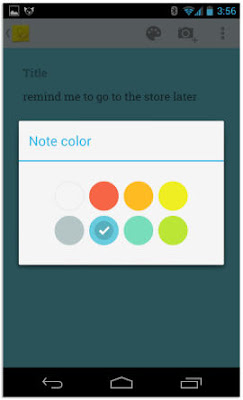
In addition to this, You can also select a different color for each note. So just select the favorite color you like.
You can also add a photo to any existing note by tapping on the camera along the top of the screen. Any photo you add has to be taken at the time you add it; you cant add previously snapped photos from your Gallery.
Once youre done with a note you can archive it by swiping in either direction across the note.

To rearrange notes you simply tap and hold on a note and drag it to where you want it. You can change the layout between multicolumn and single-column view through the menu.

The Google Drive page for Keep is pretty straightforward. You can add, edit, archive, and delete your notes with just a few clicks, mirrors the basic function as the Android app.
Source: Google via CNET
Sunday, August 31, 2014
Tuesday, August 26, 2014
Extend Battery Life on Android
Extend Battery Life on Android | If you have problems with batteries in the device Android wasteful, application of "2X Battery" can help overcome them. This application claims the battery life can extend for several hours.

This is done by way of intelligently managing data connections and transparently. Do not want to miss to download this application from Google Play Store. For this application has been downloaded by more than one million times. No more need to regulate the activation of connection of data manually. This application can save the data consumption and reduce the cost of planning a data connection to perform toogle mobile data in standard mode.
So, you can extend the battery easily and keep the background in mobile data synchronization. Whitelist feature allows the application to not arbitrarily decide the data connection when the applications are in the whitelist list is running. But the "2X Battery" will not toggle when data connection is active WiFi connection.
2. See what percentage of power used by applications that are active
3. Free
2. The menu is not user friendly, so it is somewhat confusing in the beginning of using
3. In the free version, you can not use Nigh mode. You need to upgrade to Pro version to get that mode. (FORSEL)
Source : Ligaponsel.com
Read More..
This is done by way of intelligently managing data connections and transparently. Do not want to miss to download this application from Google Play Store. For this application has been downloaded by more than one million times. No more need to regulate the activation of connection of data manually. This application can save the data consumption and reduce the cost of planning a data connection to perform toogle mobile data in standard mode.
So, you can extend the battery easily and keep the background in mobile data synchronization. Whitelist feature allows the application to not arbitrarily decide the data connection when the applications are in the whitelist list is running. But the "2X Battery" will not toggle when data connection is active WiFi connection.
Excess 2X Battery:
1. Automatically manages the data connection to save battery power2. See what percentage of power used by applications that are active
3. Free
2X Battery Disadvantages:
1. The application is packed with advertisements from sponsors2. The menu is not user friendly, so it is somewhat confusing in the beginning of using
3. In the free version, you can not use Nigh mode. You need to upgrade to Pro version to get that mode. (FORSEL)
Source : Ligaponsel.com
Saturday, August 23, 2014
Philips Xenium X513 Dual On GSM Mobile
Philips Xenium X513 - This time the news mentions that Philips will present a new cell phone, probably to the design will look "old school" the same as the previous phones. Named Xenium X513 mobile phone has a design that looks ordinary. It should be remembered, mobile phone Philips Xenium generation still has loyal users, who of course are still faithful to wait for a battery-powered mobile phones are superior.
 Philips Xenium X513 is equipped with 2MP camera, dual on GSM, GPRS 12, Bluetooth v2.0 (A2DP), miniUSB 2.0 port, music and video player and FM radio. This phone has a capacity of 2000 mAh battery, which is claimed has endurance of 20 hours to talk. And standby time up to 1440 hours (approximately 60 days or 2 months).
Read more �
Read More..
Read more �
Thursday, August 21, 2014
Tips on How to Prevent BlackBerry Suck Pulse
Tips on How to Prevent BlackBerry Suck pulse - This pulse suction problem experienced by many BlackBerry users, many customers are complaining aside the drastically. Here are some steps or "Tips on How to Prevent BlackBerry Suck pulse" in order not to continue to occur.
1. Check Browser Configuration
- Open the browser
- Select option
- Select browser configuration
- Make sure on the browser is Internet Browser
2. Check Browser General Properties
- Select a browser
- Select option
- Select general properties
- Make sure the options on the default browser is Internet Browser
3. Check the Default Browser
- To select the menu option
- Select the advanced option
- Select a browser
- Make sure the default browser is Internet Browser configurationnya
4. Check Advance Option
- On the menu select Options
- Select the advanced option
- Select Browser Push
- Remove the check mark in the Enable WAP Push
- Remove the checkmark on the option Allow WAP Push Application
5. Check APN setting
- To select the menu option
- Select the advanced option
- Select TCP/IP
- Check on the APN Settings Enabled
- The contents of APN with blackberry.net
- User and password blank
- And save
6. Check the Option Data Roaming
- On the menu select Options
- Select Mobile Network
- Change in While Roaming option to Off.
7. �berSocial BIS Settings
- options
- Next to the selection of Network Options
- Select BIS (BlackBerry Internet Service)
- Mark WiFi Use If Available.
Those are some settings in your BlackBerry is required in order to avoid automatic suction pulses due to the use of the network outside the BIS (BlackBerry Internet Connection). At least Tips on How to Prevent BlackBerry Suck These pulses can help.
Read More..
1. Check Browser Configuration
- Open the browser
- Select option
- Select browser configuration
- Make sure on the browser is Internet Browser
2. Check Browser General Properties
- Select a browser
- Select option
- Select general properties
- Make sure the options on the default browser is Internet Browser
3. Check the Default Browser
- To select the menu option
- Select the advanced option
- Select a browser
- Make sure the default browser is Internet Browser configurationnya
4. Check Advance Option
- On the menu select Options
- Select the advanced option
- Select Browser Push
- Remove the check mark in the Enable WAP Push
- Remove the checkmark on the option Allow WAP Push Application
5. Check APN setting
- To select the menu option
- Select the advanced option
- Select TCP/IP
- Check on the APN Settings Enabled
- The contents of APN with blackberry.net
- User and password blank
- And save
6. Check the Option Data Roaming
- On the menu select Options
- Select Mobile Network
- Change in While Roaming option to Off.
7. �berSocial BIS Settings
- options
- Next to the selection of Network Options
- Select BIS (BlackBerry Internet Service)
- Mark WiFi Use If Available.
Those are some settings in your BlackBerry is required in order to avoid automatic suction pulses due to the use of the network outside the BIS (BlackBerry Internet Connection). At least Tips on How to Prevent BlackBerry Suck These pulses can help.
Thursday, August 14, 2014
Malicious applications on Android Market
Android phone users are expected to be more careful. The reason is reportedly found in a special software that is harmful to users of Googles mobile OS is based.
Software is capable of stealing personal data belongs to millions of users Android and delivered to a site that is located at www.imnet.us. After investigation, the site seems to belong to someone who is located in Shenzhen, China
The software itself camouflaged with a custom background wallpaper application was distributed officially in Googles Android Market for free. The danger, this application has been downloaded 4.6 million times as much.
After Android users downloading, then the criminals collect data such as history browsing, messaging, mobile phone SIM card number of users, identification number to subscribe, even voice mail password.
"The number is certainly not currently known as Android Market does not release detailed data," says Dean Takahashi of VentureBeat security firm.
Read More..
Software is capable of stealing personal data belongs to millions of users Android and delivered to a site that is located at www.imnet.us. After investigation, the site seems to belong to someone who is located in Shenzhen, China
The software itself camouflaged with a custom background wallpaper application was distributed officially in Googles Android Market for free. The danger, this application has been downloaded 4.6 million times as much.
After Android users downloading, then the criminals collect data such as history browsing, messaging, mobile phone SIM card number of users, identification number to subscribe, even voice mail password.
"The number is certainly not currently known as Android Market does not release detailed data," says Dean Takahashi of VentureBeat security firm.
Monday, August 11, 2014
Buy Samsung Galaxy S4 only after a hands on experience!
Samsung already expects sales volume to exceed all estimations, taking the decision to open more minicenters throughout the U.S. in areas with major sales. These selling points will first appear only in locations with heavy traffic, according to official sources, their purpose being to meet the great demand for Samsung Galaxy S4.
Friday, August 8, 2014
Skype on iPhone Can Multitasking
Skype application on iPhone has been updated related iOS4 arrival. With this, the Skype application on the iPhone also supports multitasking. Multitasking feature is only available for the iPhone 4 and iPhone 3GS.
User applications can now receive Skype calls or take a chat when the application is not running on the iPhone home page.
This allows users to perform chat Voice Over Internet Protocols (VoIP), while reading the pdf, typed emails, or doing other things with their beloved iPhone. Please download Skype for iPhone on the following link.

Read More..
User applications can now receive Skype calls or take a chat when the application is not running on the iPhone home page.
This allows users to perform chat Voice Over Internet Protocols (VoIP), while reading the pdf, typed emails, or doing other things with their beloved iPhone. Please download Skype for iPhone on the following link.

How to play MKV AVI iTunes M4V Videos and more on Samsung galaxy s4
Samsung galaxy s4 has been officially announced last week and is packed with a number of pretty amazing new features. The Galaxy s4 sports a 5-inch full-HD display with an impressive 1920x1080 resolution, and pixel density of 441ppi. Thanks to its faster processor (1.9GHz quad-core or 1.6GHz octa-core), large screen and Smart pause feature, you will embrace the best experience when you are watching a video on Galaxy s4. But due to Galaxy S4 just support limited video formats, and people from androidfroums have problem about how to play MKV videos and more video formats on Android phone, So here we are going to talk about how to play MKV, AVI, WMV, MOV, M4V and more videos like YouTube videos on Galaxy S4 freely(Android phones include).

1. Download a video player on your phone
Download a video player on Samsung galaxy s4 is the simplest way in order to watch most of the common videos on the handset without conversion, anytime and anywhere.

1. Download a video player on your phone
Download a video player on Samsung galaxy s4 is the simplest way in order to watch most of the common videos on the handset without conversion, anytime and anywhere.
We can install video player like Mobo Video Player, MX Video Player, QQ Video Player or V Video Player on the Galaxy s4, as they all can play MKV, AVI, WMV, MOV, FLV movies and videos on the device. So when you know this youll get it easy to play your favorite MKV or other formats movies or videos on your phone.
2. Getting help from computer
If you want watch videos of all kinds on Galaxy S4 like iTunes M4V movies (usually the .M4V movies on iTunes are DRM protected) or Xvid, DivX, RM, MTS, M2TS videos on the Galaxy s4, we arent able to watch iTunes videos or movies on Galaxy s4 without authorizing. The key to make it possible to transfer iTunes M4V videos or other videos to the device is remove DRM from iTunes .M4V videos, and then convert the iTunes M4V movies or other videos formats to MP4 with H.264 codec by using a video converter. And here I recommend you to use this HD video converter, because it can convert videos at fast speeds and high quality.
3. Save YouTube HD Video to Samsung Galaxy S4
Today lots of people prefer to enjoy different kind of videos on YouTube like news, movie, music and others on their android phones, so how can we watch HD YouTube Videos without any limitless? There are many method that we can use and the best way is save the youtube videos on our device. Getting help from computer could make YouTube downloading be much easier, such as use a free youtube downloader just go to online download sites like keepvid.com or savevid.com/ .
Here is the official Galaxy S4 YouTube videos from Samsung:
Read More..
2. Getting help from computer
If you want watch videos of all kinds on Galaxy S4 like iTunes M4V movies (usually the .M4V movies on iTunes are DRM protected) or Xvid, DivX, RM, MTS, M2TS videos on the Galaxy s4, we arent able to watch iTunes videos or movies on Galaxy s4 without authorizing. The key to make it possible to transfer iTunes M4V videos or other videos to the device is remove DRM from iTunes .M4V videos, and then convert the iTunes M4V movies or other videos formats to MP4 with H.264 codec by using a video converter. And here I recommend you to use this HD video converter, because it can convert videos at fast speeds and high quality.
3. Save YouTube HD Video to Samsung Galaxy S4
Today lots of people prefer to enjoy different kind of videos on YouTube like news, movie, music and others on their android phones, so how can we watch HD YouTube Videos without any limitless? There are many method that we can use and the best way is save the youtube videos on our device. Getting help from computer could make YouTube downloading be much easier, such as use a free youtube downloader just go to online download sites like keepvid.com or savevid.com/ .
Here is the official Galaxy S4 YouTube videos from Samsung:
Saturday, August 2, 2014
LG have 3000 Applications on Application Store
LG Electronics officially open a new application stores in 23 countries, LG Application Store since July 1, 2010 this. Vendors application store from South Korea is providing approximately 3000 applications.

LG is also temporary application only supports applications for the Windows Mobile operating system only. LG plans later this year will provide an application that supports OS Android. Starting from the game until the application of SNS (Social Networking Service), IM (Instant Messenger), VoIP (Voice over Internet Protocol), and navigation.
Store application is a weapon for our vendors to indulge once ponslel attract prospective buyers. Based on data strategu Analytics, 90 percent of phone owners are very interested in social networking applications, and Instant Messaging.
LG targets at year end 2010, the number of applications in the store reaches approximately 4000 and expand its services in 33 countries.[ligaponsel.com]
Read More..
LG is also temporary application only supports applications for the Windows Mobile operating system only. LG plans later this year will provide an application that supports OS Android. Starting from the game until the application of SNS (Social Networking Service), IM (Instant Messenger), VoIP (Voice over Internet Protocol), and navigation.
Store application is a weapon for our vendors to indulge once ponslel attract prospective buyers. Based on data strategu Analytics, 90 percent of phone owners are very interested in social networking applications, and Instant Messaging.
LG targets at year end 2010, the number of applications in the store reaches approximately 4000 and expand its services in 33 countries.[ligaponsel.com]
Subscribe to:
Posts (Atom)
