Showing posts with label pc. Show all posts
Showing posts with label pc. Show all posts
Wednesday, November 19, 2014
Top 5 Best Blu ray Player Software for PC in 2013
 The increasing popularity of Blu-ray among movie enthusiasts gradually drives the entire Blu-ray ecosystem into its maturity, and today Playing Blu-ray movies on portable device or on a windows pc doesnt have to be difficult. But if you want true Blu-Ray movies or 1080 HD video quality on your pc, youll need a Blu-ray media player thats up to the task. Here is the Top 5 Best Blu-Ray Player Software for playing Blu-rays on PC.
Top 5: Free Blu-ray Media Player
I have download the program on my Samsung laptop and find the software provides extremely superb experience for Blu-ray, DVD, DVD ISO files, folders and HD movie playback with full Blu-ray and HD movie playback navigation.This Blu-ray player is under test now and everyone stand a chance to get the Blu-ray Movie Player once its officially released.So let us together witness the born of the best Blu-ray Player! But this application lacks key features we look for such as 3D support.
Note: Download & Test + Submit Review = Get a free Blu ray player.
Top 4: DVDFab Media Player
DVDFab Media Player is a Windows based media player software that can not only plays Blu-ray & DVD discs with Blu-ray Navigation Menu, but also plays Blu-ray & DVD folders, ISO image files and along with almost any media file format you have on your computer.
But this application lacks key features we look for such as 3D support and the ability to upscale SD video to fit an HD screen. The software cost you $49.99.
Top 3: TotalMedia Theatre 6
TotalMedia Theatre 6 all bring you full Blu-ray support, support 3D Blu-ray, and supports upscaling other standard definition video, both locally on your system and DVDs you put into your system. You can also convert 2D movies to 3D with this software. Total Media also supports streaming video from YouTube and other Internet sources, the ability to change your systems region code to match the disc you want to play, and serves as an all-in-one media management tool and player for almost any video and audio type and format. But This Blu-ray player software does not feature karaoke capabilities, and you cannot customize your user interface.
Top 2: Corel WinDVD Pro 11
Corel WinDVD Pro 11 is advanced 2D and Blu-ray 3D player software that supports Blu-ray 3D, AVCHD, DVD playback and all the latest video formats. This newest version is stacked with features such as 3D playback technology, 2D to 3D conversion, HD upscaling, superior sound and more! Plus, WinDVD Pro 11 uniquely includes a premium online movie search engine that finds your favorite movies at the lowest price from popular websites. Bring Hollywood home with WinDVD Pro 11!
Unfortunately, it doesnt offer support for some of the lesser-known disc types such as VCD and SVCD. The software has a free trial available, but a full license will cost you $49.99.
Top 1: CyberLink PowerDVD
With over 100 million copies shipping annually, there is no doubt that PowerDVD is the world�s leading Blu-ray, 3D & HD media player. PowerDVD fully supports Blu-ray discs, upscale standard definition content, plays just about any other type of video include YouTube and Facebook, and even supports audio playback and photo slideshows. Now Power DVD comes in three flavors, Deluxe for $54.95, Pro For $79.95 and Ultra for $99.95.
Now that youve seen the top five, its time to vote for an all out winner.

Tuesday, September 2, 2014
How to get started with Google Keep on your Android Device or PC
Google yesterday officially announced its new note-taking service, named Google Keep, which allows users to sync notes and to-do lists across your computer, phone and tablet using your Google account. But now the app right now is only available for android devices running Android 4.0.3 and up, or through the Google Drive Web site. Today here I will introduce you how to get started with Googles new note-taking app Keep.
 Of course, in order to get started with Google Keep on your android device, you should download the Android app and install it on your device in advance. You can find the tool at drive.google.com/keep or in the Play Store for Android 4.0 and up.
After installing the app youll be prompted to select the Google account you want to use with Keep. Once thats done, you can begin keeping notes. There are four different methods you can use to enter a note:
You can also add a photo to any existing note by tapping on the camera along the top of the screen. Any photo you add has to be taken at the time you add it; you cant add previously snapped photos from your Gallery.
Once youre done with a note you can archive it by swiping in either direction across the note.


Now There are two widgets included with the app. The first widget will place a shortcut bar to create notes with, and will let you scroll through your existing notes directly from your home screen. The second widget is only a shortcut bar. Should you be using an Android device running Android 4.2 or later, youll be able to add either widget to your lock screen for quick access to your Keep entries.
The Google Drive page for Keep is pretty straightforward. You can add, edit, archive, and delete your notes with just a few clicks, mirrors the basic function as the Android app.

The combination of various note types is nice; a checklist for shopping, photos to help you remember something, and voice notes for when you cant type a long note. But can it beat alternatives like Evernote, which now had 34 million users? The answer is no and Theres some work Google need to do with Keep.
Source: Google via CNET
Read More..
- A quick note directly from the text box on the initial screen.
- Add a checklist by tapping on the check mark icon.
- Create a voice memo by tapping on the microphone. All memos are instantly transcribed, keeping both the audio and text in the note.
- Add a photo as a note by tapping on the camera.

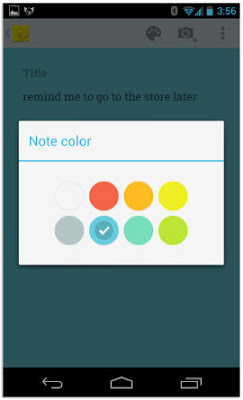
In addition to this, You can also select a different color for each note. So just select the favorite color you like.
You can also add a photo to any existing note by tapping on the camera along the top of the screen. Any photo you add has to be taken at the time you add it; you cant add previously snapped photos from your Gallery.
Once youre done with a note you can archive it by swiping in either direction across the note.

To rearrange notes you simply tap and hold on a note and drag it to where you want it. You can change the layout between multicolumn and single-column view through the menu.

The Google Drive page for Keep is pretty straightforward. You can add, edit, archive, and delete your notes with just a few clicks, mirrors the basic function as the Android app.
Source: Google via CNET
Thursday, August 21, 2014
HTC Flyer first PC Tablet of HTC
HTC Flyer | first PC Tablet of HTC - HTC will release first PC Tablet that called HTC Flyer. begin from the most important hardware, HTC Flyer will have a 7-inch touch screen with resolution 600x1024 pixels, and the screen has the ability to receive a touch of the pen, this is the newest technology that HTC Scribe. This will makes the HTC Flyer be the first tablet PC with the ability to work with pen. This feature will be used to record and draw.
 Tablet will make from unibody alumunium which is trademark of HTC. HTC Flyer will use 1,5 ghz single core processor, and 1 Gb RAM, and with 32 storage. for making picture HTC flyer will provide 5 MP camera as a prime camera and also equipped with 1.3 mp second camera. and this HTC flyer also have wonderful weapon, it is battery 1000mAh, that able to running video for 4 hour.
This HTC Flyer will released at second quarter in 2011, it is cause any device that will added to this HTC. so, HTC Flyer will be one of the powerful compete on PC Tablet market.
Read More..
This HTC Flyer will released at second quarter in 2011, it is cause any device that will added to this HTC. so, HTC Flyer will be one of the powerful compete on PC Tablet market.
Saturday, August 2, 2014
Coby Release PC Tablet Android MID7015 Kyros
Coby Release PC Tablet - Coby offers the latest Android tablet, 2011, they were the Android MID7015 Kyros. Kyros is designed to access the Internet with a strong and flexible with a touchscreen display with intuitive controls and is supported by the operating system Android 2.1

 Enjoy 1080P HD video, photos, music, and other features in the comfort of your living room, when you connect to your TV via HDMI Kyros. Coupled with the built-in 4GB of internal memory and comes with a microSD card slot to increase capacity to 16GB. It also allows you to access the Internet wirelessly via hi-speed network support and includes over a dozen built-in applications, each identified with an icon.
Among the applications included is an alarm clock, a browser to surf the web, calculator, email, galleries to see and play videos, music and video player for mobile browser launch YouTube page to watch Internet videos and more!
In addition, Kyros offers two unique applications, Aldiko E-Book, for downloading and reading thousands of e-books (which supports ePub standard) and AppsLib, to browse, download and install applications from the market AppsLib for complete mobile Internet solutions.
Specifications Coby Android Latest Tablet 2011 MID7015 Kyros:
- 800MHz processor Telechips TTC8902
- the 7-inch 800 x 480 resistive touchscreen
- a 4GB internal storage
- microSD card slot
- WiFi
- USB 2.0 ports, HDMI port
- 3200mAh battery
- and runs on the Android OS 2.1
Read More..
Among the applications included is an alarm clock, a browser to surf the web, calculator, email, galleries to see and play videos, music and video player for mobile browser launch YouTube page to watch Internet videos and more!
In addition, Kyros offers two unique applications, Aldiko E-Book, for downloading and reading thousands of e-books (which supports ePub standard) and AppsLib, to browse, download and install applications from the market AppsLib for complete mobile Internet solutions.
Specifications Coby Android Latest Tablet 2011 MID7015 Kyros:
- 800MHz processor Telechips TTC8902
- the 7-inch 800 x 480 resistive touchscreen
- a 4GB internal storage
- microSD card slot
- WiFi
- USB 2.0 ports, HDMI port
- 3200mAh battery
- and runs on the Android OS 2.1
Monday, July 28, 2014
ASUS Eee PC 1225B Manual User
 ASUS Eee PC 1225B Manual User - The ASUS Eee 1 one225B is notebook that supported by AMD Fusion APU E450 1.65GHz (dual core) or C60 1.0GHz (dual core) processor. This netbook has diplay is 11.6 diode Backlight WXGA screen. The ASUS Eee pc 1225B price: returning presently. Congratulations if had bought the ASUS Eee computer 1225B. On the netbook in fact several applications and options you wish to undertake. For it, as a reference or pointers remember to browse the manual or user guide PDF of ASUS Eee pc 1225B. As owner or sensible user of this netbook, try and browse rigorously step by step from the ASUS Eee pc 1225B manual as a result of once your ASUS Eee computer 1225B has operated properly and consistent with the procedure, then this may be helpful to the sturdiness of your netbook. If there area unit obstacles or issues together with your netbook, because the answer ideally before contacting asus service center, browse all necessary instruction that area unit within the ASUS Eee pc 1225B Manual. however if you lose with the ASUS Eee pc 1225B user manual, youll be able to download it directly asus.com official web site. As data for you, when we tend to browse the ASUS Eee pc 1225B owner manual, there area unit some necessary data like safety, netbook half summary with explained special operate keys, firs time startup guide, netwroking affiliation setting like local area network, browsing pages, Asus update information, change the BIOS through the net, change the BIOS through a BIOS file, Bluetooth affiliation, Media Sharing, Microsoft workplace Starter 2010, System Recovery (for models with Windows 7 OS only), Service and Support, adn more. For data concerning the ASUS Eee pc 1225B specs or full specification, youll be able to browse below when table of content for the ASUS Eee pc 1225B review.
Table of contents for the ASUS Eee PC 1225B manual such as:
- About This User Manual
- Safety Precautions
- Knowing the Parts
- Getting Started
- First-time Startup
- Network Connection
- Using your ASUS 1225/R252 Series
- ASUS Update
- System Recovery
- Appendix
ASUS Eee PC 1225B specs / specification and features include:
- Supported by AMD Fusion APU E450 1.65GHz (dual core)/C60 1.0GHz (dual core) processor
- AMD Radeon HD 6320/AMD Radeon HD 6290 graphics video card
- It has 11.6 LED Backlight WXGA screen display, 1366�768 pixels resolution
- Used Genuine Windows 7 Home Premium operating system / platform
- Available 2GB/4GB of DDR3 RAM (1 x On Board Memory), 320GB/500GB/750GB HDD storage
- Connectivity: 802.11 b/g/n 2.4GHz WLAN Wi-Fi, Bluetooth V3.0+HS (Optional)
- Equipped 0.3 MP web camera, 1 x Card Reader : SD/ SDHC/ SDXC/ MMC
- Support for Hi-Definition Audio CODEC, high quality mic, stereo speakers, 1 x VGA Connector
- Port: 1 x USB 2.0, 2 x USB 3.0, 1 x LAN RJ-45, 1 x HDMI, 2 x Audio Jack (Headphone/Mic-In)
- Powered by 6-cell 56Wh Li-ion battery
Download free pdf manual from asus.com here:ASUS Eee PC 1225B Manual (English | 4.5 MB (in ZIP file) | 63 pages)
Subscribe to:
Posts (Atom)
