Showing posts with label google. Show all posts
Showing posts with label google. Show all posts
Tuesday, September 2, 2014
How to get started with Google Keep on your Android Device or PC
Google yesterday officially announced its new note-taking service, named Google Keep, which allows users to sync notes and to-do lists across your computer, phone and tablet using your Google account. But now the app right now is only available for android devices running Android 4.0.3 and up, or through the Google Drive Web site. Today here I will introduce you how to get started with Googles new note-taking app Keep.
 Of course, in order to get started with Google Keep on your android device, you should download the Android app and install it on your device in advance. You can find the tool at drive.google.com/keep or in the Play Store for Android 4.0 and up.
After installing the app youll be prompted to select the Google account you want to use with Keep. Once thats done, you can begin keeping notes. There are four different methods you can use to enter a note:
You can also add a photo to any existing note by tapping on the camera along the top of the screen. Any photo you add has to be taken at the time you add it; you cant add previously snapped photos from your Gallery.
Once youre done with a note you can archive it by swiping in either direction across the note.


Now There are two widgets included with the app. The first widget will place a shortcut bar to create notes with, and will let you scroll through your existing notes directly from your home screen. The second widget is only a shortcut bar. Should you be using an Android device running Android 4.2 or later, youll be able to add either widget to your lock screen for quick access to your Keep entries.
The Google Drive page for Keep is pretty straightforward. You can add, edit, archive, and delete your notes with just a few clicks, mirrors the basic function as the Android app.

The combination of various note types is nice; a checklist for shopping, photos to help you remember something, and voice notes for when you cant type a long note. But can it beat alternatives like Evernote, which now had 34 million users? The answer is no and Theres some work Google need to do with Keep.
Source: Google via CNET
Read More..
- A quick note directly from the text box on the initial screen.
- Add a checklist by tapping on the check mark icon.
- Create a voice memo by tapping on the microphone. All memos are instantly transcribed, keeping both the audio and text in the note.
- Add a photo as a note by tapping on the camera.

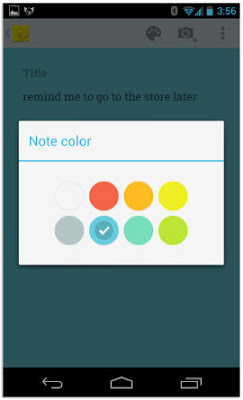
In addition to this, You can also select a different color for each note. So just select the favorite color you like.
You can also add a photo to any existing note by tapping on the camera along the top of the screen. Any photo you add has to be taken at the time you add it; you cant add previously snapped photos from your Gallery.
Once youre done with a note you can archive it by swiping in either direction across the note.

To rearrange notes you simply tap and hold on a note and drag it to where you want it. You can change the layout between multicolumn and single-column view through the menu.

The Google Drive page for Keep is pretty straightforward. You can add, edit, archive, and delete your notes with just a few clicks, mirrors the basic function as the Android app.
Source: Google via CNET

Sunday, August 24, 2014
Google Nexus 7 Specifications User Manual Price
Google Nexus 7 Specifications, User Manual, Price - The latest news for the Google Nexus 7 tablet. This tablet additionally typically referred to as because the Asus Nexus tablet or Google Nexus tablet. It comes with Quad core, 1300 MHz processor with Tegra three chip and runs on the android (4.1) package. itll be discharged Q3 2012. It has 7.00 inches, IPS LCD, Capacitive, Multi-touch Touchscreen, 1280 x 800 pixels resolution. The tablet has physical Dimensions of 198.5 x 120 x ten.45 mm with weight regarding 340 g. the inner storage feature of this tablet embrace 16000 MB and different possibility embrace 8000 MB (8 GB), sadly the external memory not out there. The Google Nexus 7 is tablet that has blessings like supported by a high speed processor and much of RAM. a lot of detail regarding the Google Nexus 7 Specifications, different options, User Manual download PDF, and worth data as follows:

Google Nexus 7 Tablet Full Specifications:
- Available 1024 MB RAM
- Supported by NVidia GeForce 12-core GPU Graphics processor
- Equippes with camcoder and front facing camera
- Powered by 4325 mAh, stand by time: 300 hours
- Support YouTube (upload), Picasa, HTML, HTML5, Chrome browser for access the internet
- Connectivity: Bluetooth, Wi-fi 802.11 b, g, n, a, USB 2.0, NFC, Computer sync, OTA sync
- Other features and specs: YouTube player, Music player, GPS, Unlimited entries phonebook, Calendar, Alarm, Document viewer, Calculator, email, Music ringtones (MP3), Polyphonic ringtones, Vibration, Accelerometer, Gyroscope, Compass, Voice commands, Voice recording
Google Nexus 7 User Manual & Price
The Google Nexus 7 User manual or owner guide has been published and you can download in PDF format. For viewing the user manual you can using Free PDF software like adobe reader or foxit reader. In the user manual you can get information and learn about setting up tablet, reset, back up guide, using applications, connecting guide, tips and trick also other tutorial. You can read and download the user manual review here. While for the Google Nexus 7 MSRP price at $ 249 (16 GB) and 199 $ (8GB).
Sunday, August 10, 2014
Google I O 2013 Android 5 0 Key Lime Pie New Nexus 7 Motorola X and more
The big conference Google I/O 2013 is happening next month and will run from 15 -17 May. Last year, Google introduced the Nexus 7, Android 4.1 Jellybean, the now-abandoned Nexus Q and a lot more. Now rumors said the next Android 5.0 Key Lime Pie, next-gen Nexus 7 and more exciting things will announced. So today let�s jump right into our guesses and hopes for what we�ll see at Google�s biggest conference of the year.
1. Android 5.0 Key Lime Pie
 Whatever else Google announces, nothing will grab the headlines like the next major version of Android.
But the techies all agree that Google will probably just give Android followers a peek at the new OS since the current Android 4.2v update is not yet available on many devices yet. We didn�t see a major update in UI with Android 4.1 or 4.2 from Android 4.0, so if Google is going to release the Android 5.0, it will be refined, polished, and smooth � and it will be fast in order to compete with Apple!
2. New Nexus 7
 Google introduced to the Nexus 7 tablet at the last I/O, so it wouldn�t be surprised if we saw a new version-running Android 5, maybe. According to news from BGR, the Nexus 7.7 will have a Tegra 4 processor, a 7.7-inch, 1,920 x 1,200-pixel display, 8GB of storage, and both front and rear high-def cameras. 3G service and a price tag within the range of $149 to $199. Rumours said it would have an expanded screen size of 8 inches to rival the iPad Mini and Samsung Galaxy Note 8.
3. Lower Price for the Original Nexus 7


But the techies all agree that Google will probably just give Android followers a peek at the new OS since the current Android 4.2v update is not yet available on many devices yet. We didn�t see a major update in UI with Android 4.1 or 4.2 from Android 4.0, so if Google is going to release the Android 5.0, it will be refined, polished, and smooth � and it will be fast in order to compete with Apple!
2. New Nexus 7

3. Lower Price for the Original Nexus 7

It is logical to expect a lower price for the original Nexus 7 once its old brother is released. Among the anticipated price tags for this device at $149, $129 and $99.
4. Motorola X Phone

4. Motorola X Phone

Sticking with the mobile space, Google I/O 2013 may also witness the debut of the mythical Motorola X, the superphone Google is said to be working on ever since it completed the Motorola acquisition. The company is said to be throwing everything its got at this new halo device, which is why it may not be ready in time for I/O. If it is, expect it to be the star of the show.
5. Nexus 5

5. Nexus 5

Google Nexus 4 has made a big success and has been selling out in stores across the U.S. But in order to compete better with the new Galaxy S4, HTC One and iPhone 5, Google need to update the Nexus 4, namely the Nexus 5. The Nexus 5 is expected boost an improved processor, camera and LTE support and so on.
6. Google Glass

6. Google Glass

Glass was laughed off by many as a pipe dream when it was unveiled at I/O last year, but 12 months on these smart glasses are gathering significant momentum. With competition winners having already received their Google Glass samples, we expect I/O 2013 to provide significant updates regarding retail availability and app developer programmers. I suspect we�ll see Google Glass officially announced as a consumer product at I/O 2013 and available for sale within a few months following the conference.
7. Google Now
 At last year�s Google I/O we saw Google�s answer to Siri: Google Now. Since then we�ve seen a few updates and to Google Now that have added features and functionality, but many in the industry are suspicious about why we haven�t seen more. I think Google�s been holding back on us and we�ll see a rush of new features for Google Now that will blow us away. What�s more, we�ll probably see Google Now for iOS demo�d.
8. Google Babble
 Babble is expected to unite Chat, Talk, Voice and Google Plus communication into a single service with the same conversations and features available everywhere. It seems the company has plans to go toe-to-toe with Apple�s iMessage and BlackBerry Messenger long term. Interestingly Babble is also said to incorporate notification syncing, a long overdue feature that dismisses notifications on all your devices once they are checked on one.
9. Home Automation
It�s been a while since we heard about the ADK and Google�s push for home automation. This time around I suspect we�ll see some real-world products that can be easily controlled by your Android-powered phone or tablet. Either that or the ADK will fade into obscurity, never to be heard of again.
So what else do you expect to see at this year�s Google I/O? Welcome to show your comments below!
Read More..
7. Google Now

8. Google Babble

9. Home Automation
It�s been a while since we heard about the ADK and Google�s push for home automation. This time around I suspect we�ll see some real-world products that can be easily controlled by your Android-powered phone or tablet. Either that or the ADK will fade into obscurity, never to be heard of again.
So what else do you expect to see at this year�s Google I/O? Welcome to show your comments below!
Subscribe to:
Posts (Atom)
