Showing posts with label to. Show all posts
Showing posts with label to. Show all posts
Wednesday, November 5, 2014
5 best free music apps for android to make you enjoy the music
Whether you are riding the subway to work, walking in the park, or simply chilling at home, music is obviously the best way to help us get into a good mood. If you�re the type that needs to have music on hand at all times, then rest easy, Today, I picked up 5 best music apps for Android for you in the Music streaming market, and some of them are free. Now let�s get it start.
Now Let�s go through some of the best Android apps for music lovers.
Top 5: Spotify (Rated: 4.0)
Spotify gives you instant access to millions of songs on your Android device.With the Spotify app, you can choose to listen for free, or subscribe to Spotify Premium.
Spotify also offer Free radio service, but US only. US users can listen to radio for free. Discover and save music on the go! If your station plays a song you really like , you can save it with a single tap. Unlimited songs and stations are Provided.
 Top 4: Winamp (Rated: 4.4)
Winamp is a Ultimate Media Player for Android.
With the app, you can play, manage and sync music from your Mac or PC to your Android device. Winamp for Android offers a complete music management solution (2.1 OS & above) featuring wireless desktop sync (latest Winamp Media Player required), iTunes library import, & access to thousands of internet radio stations with SHOUTcast. Visit the Official website to learn more.
 Top 3: SoundHound (Rated: 4.4)
Whats that song? You can Identify it FAST with SoundHound.
Unlimited music recognition! Featuring the worlds fastest, most accurate music identification, exclusive singing search, and now: free unlimited LiveLyrics for over 1 million of your favorite songs
 Top 2: Shazam (Rated: 4.5)
Shazam can identifie a song you dont know instantly. Free and Unlimited.
Faster tagging. With the app, discover, explore and share more music, TV shows and brands you love in as little as one second.
With free and unlimited tagging use Shazam as much as you want, and experience more of what you like, faster.
Top 1: Pandora� internet radio (Rated: 4.5) Free
Pandora radio is a personalized radio service that streams music on your phone.
Pandora is free, personalized radio that plays music and comedy youll love. Just start with the name of one of your favorite artists, songs, comedians, or composers and Pandora will create a custom station that plays similar tracks. Pandora features hundreds of music and comedy genre stations ranging from Dubstep to Smooth Jazz to Power Workout.
With the app, whether you are in the car, at the gym, or on the train,you can listen wherever and whenever youre in the mood for great music.
 Now Microsoft will introduce its new Xbox Music on Oct. 26, initially targeting Xbox 360 consoles before expanding the streaming service to tablets and PCs running Windows 8 and Windows RT, as well as smartphones powered by the forthcoming Windows Phone 8. Microsoft is also planning to support rival platforms, including Apples iOS and Googles Android. It seems that the music streaming industry is becoming increasingly popular.
Read More..
Now Let�s go through some of the best Android apps for music lovers.
Top 5: Spotify (Rated: 4.0)
Spotify gives you instant access to millions of songs on your Android device.With the Spotify app, you can choose to listen for free, or subscribe to Spotify Premium.
Spotify also offer Free radio service, but US only. US users can listen to radio for free. Discover and save music on the go! If your station plays a song you really like , you can save it with a single tap. Unlimited songs and stations are Provided.

Winamp is a Ultimate Media Player for Android.
With the app, you can play, manage and sync music from your Mac or PC to your Android device. Winamp for Android offers a complete music management solution (2.1 OS & above) featuring wireless desktop sync (latest Winamp Media Player required), iTunes library import, & access to thousands of internet radio stations with SHOUTcast. Visit the Official website to learn more.

Whats that song? You can Identify it FAST with SoundHound.
Unlimited music recognition! Featuring the worlds fastest, most accurate music identification, exclusive singing search, and now: free unlimited LiveLyrics for over 1 million of your favorite songs

Shazam can identifie a song you dont know instantly. Free and Unlimited.
Faster tagging. With the app, discover, explore and share more music, TV shows and brands you love in as little as one second.
With free and unlimited tagging use Shazam as much as you want, and experience more of what you like, faster.
Top 1: Pandora� internet radio (Rated: 4.5) Free
Pandora radio is a personalized radio service that streams music on your phone.
Pandora is free, personalized radio that plays music and comedy youll love. Just start with the name of one of your favorite artists, songs, comedians, or composers and Pandora will create a custom station that plays similar tracks. Pandora features hundreds of music and comedy genre stations ranging from Dubstep to Smooth Jazz to Power Workout.
With the app, whether you are in the car, at the gym, or on the train,you can listen wherever and whenever youre in the mood for great music.


Tuesday, September 2, 2014
How to get started with Google Keep on your Android Device or PC
Google yesterday officially announced its new note-taking service, named Google Keep, which allows users to sync notes and to-do lists across your computer, phone and tablet using your Google account. But now the app right now is only available for android devices running Android 4.0.3 and up, or through the Google Drive Web site. Today here I will introduce you how to get started with Googles new note-taking app Keep.
 Of course, in order to get started with Google Keep on your android device, you should download the Android app and install it on your device in advance. You can find the tool at drive.google.com/keep or in the Play Store for Android 4.0 and up.
After installing the app youll be prompted to select the Google account you want to use with Keep. Once thats done, you can begin keeping notes. There are four different methods you can use to enter a note:
You can also add a photo to any existing note by tapping on the camera along the top of the screen. Any photo you add has to be taken at the time you add it; you cant add previously snapped photos from your Gallery.
Once youre done with a note you can archive it by swiping in either direction across the note.


Now There are two widgets included with the app. The first widget will place a shortcut bar to create notes with, and will let you scroll through your existing notes directly from your home screen. The second widget is only a shortcut bar. Should you be using an Android device running Android 4.2 or later, youll be able to add either widget to your lock screen for quick access to your Keep entries.
The Google Drive page for Keep is pretty straightforward. You can add, edit, archive, and delete your notes with just a few clicks, mirrors the basic function as the Android app.

The combination of various note types is nice; a checklist for shopping, photos to help you remember something, and voice notes for when you cant type a long note. But can it beat alternatives like Evernote, which now had 34 million users? The answer is no and Theres some work Google need to do with Keep.
Source: Google via CNET
Read More..
- A quick note directly from the text box on the initial screen.
- Add a checklist by tapping on the check mark icon.
- Create a voice memo by tapping on the microphone. All memos are instantly transcribed, keeping both the audio and text in the note.
- Add a photo as a note by tapping on the camera.

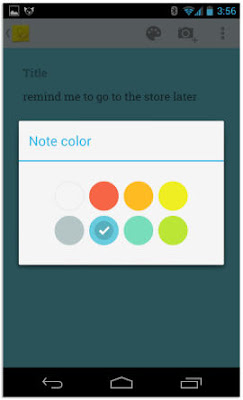
In addition to this, You can also select a different color for each note. So just select the favorite color you like.
You can also add a photo to any existing note by tapping on the camera along the top of the screen. Any photo you add has to be taken at the time you add it; you cant add previously snapped photos from your Gallery.
Once youre done with a note you can archive it by swiping in either direction across the note.

To rearrange notes you simply tap and hold on a note and drag it to where you want it. You can change the layout between multicolumn and single-column view through the menu.

The Google Drive page for Keep is pretty straightforward. You can add, edit, archive, and delete your notes with just a few clicks, mirrors the basic function as the Android app.
Source: Google via CNET
Tuesday, August 26, 2014
Droid Razr Maxx Up to 21 Hours Talk Time
Droid Razr Maxx, Up to 21 Hours Talk Time - Droid Motorola RAZR Maxx was introduced last week at CES (Consumer Electronic Show) in Las Vegas. Smart phone to be released by Verizon Wireless in the U.S. is known to date is January 26 launch.

"RAZR Maxx" looks like a twin of the RAZR, but with much better battery life. Even Motorolas claim, as a smartphone with the longest battery life available in the market. Some call that is the successor to the RAZR RAZR maxx new version. This speculation arises because the RAZR Maxx carries a large capacity battery, 3300 mAh Li ion that is claimed to be used up to 21 hours talk time. Even for the standby position can last up to 386 hours.
The rest of the features of the Motorola RAZR Maxx looks like the Android operating system 2.3.5 Gingerbread, scratch-resistant display with Corning Gorilla Glass touch screen 4.3-inch Super AMOLED, 540 x 960 pixel resolution, dual core 1.2GHz processor, 16GB ROM , 1GB of RAM and a microSD card slot to add memory.
RAZR Maxx is also supported by the LTE and WiFi, along with the 8MP camera for dual rear camera and 1.3 MP front camera, and Bluetooth 4.0. Just like the RAZR, Maxx is also scheduled to receive Android 4.0 upgrades this years Ice Cream Sandwich.
Read More..

"RAZR Maxx" looks like a twin of the RAZR, but with much better battery life. Even Motorolas claim, as a smartphone with the longest battery life available in the market. Some call that is the successor to the RAZR RAZR maxx new version. This speculation arises because the RAZR Maxx carries a large capacity battery, 3300 mAh Li ion that is claimed to be used up to 21 hours talk time. Even for the standby position can last up to 386 hours.
The rest of the features of the Motorola RAZR Maxx looks like the Android operating system 2.3.5 Gingerbread, scratch-resistant display with Corning Gorilla Glass touch screen 4.3-inch Super AMOLED, 540 x 960 pixel resolution, dual core 1.2GHz processor, 16GB ROM , 1GB of RAM and a microSD card slot to add memory.
RAZR Maxx is also supported by the LTE and WiFi, along with the 8MP camera for dual rear camera and 1.3 MP front camera, and Bluetooth 4.0. Just like the RAZR, Maxx is also scheduled to receive Android 4.0 upgrades this years Ice Cream Sandwich.
Thursday, August 21, 2014
Tips on How to Prevent BlackBerry Suck Pulse
Tips on How to Prevent BlackBerry Suck pulse - This pulse suction problem experienced by many BlackBerry users, many customers are complaining aside the drastically. Here are some steps or "Tips on How to Prevent BlackBerry Suck pulse" in order not to continue to occur.
1. Check Browser Configuration
- Open the browser
- Select option
- Select browser configuration
- Make sure on the browser is Internet Browser
2. Check Browser General Properties
- Select a browser
- Select option
- Select general properties
- Make sure the options on the default browser is Internet Browser
3. Check the Default Browser
- To select the menu option
- Select the advanced option
- Select a browser
- Make sure the default browser is Internet Browser configurationnya
4. Check Advance Option
- On the menu select Options
- Select the advanced option
- Select Browser Push
- Remove the check mark in the Enable WAP Push
- Remove the checkmark on the option Allow WAP Push Application
5. Check APN setting
- To select the menu option
- Select the advanced option
- Select TCP/IP
- Check on the APN Settings Enabled
- The contents of APN with blackberry.net
- User and password blank
- And save
6. Check the Option Data Roaming
- On the menu select Options
- Select Mobile Network
- Change in While Roaming option to Off.
7. �berSocial BIS Settings
- options
- Next to the selection of Network Options
- Select BIS (BlackBerry Internet Service)
- Mark WiFi Use If Available.
Those are some settings in your BlackBerry is required in order to avoid automatic suction pulses due to the use of the network outside the BIS (BlackBerry Internet Connection). At least Tips on How to Prevent BlackBerry Suck These pulses can help.
Read More..
1. Check Browser Configuration
- Open the browser
- Select option
- Select browser configuration
- Make sure on the browser is Internet Browser
2. Check Browser General Properties
- Select a browser
- Select option
- Select general properties
- Make sure the options on the default browser is Internet Browser
3. Check the Default Browser
- To select the menu option
- Select the advanced option
- Select a browser
- Make sure the default browser is Internet Browser configurationnya
4. Check Advance Option
- On the menu select Options
- Select the advanced option
- Select Browser Push
- Remove the check mark in the Enable WAP Push
- Remove the checkmark on the option Allow WAP Push Application
5. Check APN setting
- To select the menu option
- Select the advanced option
- Select TCP/IP
- Check on the APN Settings Enabled
- The contents of APN with blackberry.net
- User and password blank
- And save
6. Check the Option Data Roaming
- On the menu select Options
- Select Mobile Network
- Change in While Roaming option to Off.
7. �berSocial BIS Settings
- options
- Next to the selection of Network Options
- Select BIS (BlackBerry Internet Service)
- Mark WiFi Use If Available.
Those are some settings in your BlackBerry is required in order to avoid automatic suction pulses due to the use of the network outside the BIS (BlackBerry Internet Connection). At least Tips on How to Prevent BlackBerry Suck These pulses can help.
Monday, August 18, 2014
Giveaway Get your passes to H Artistry 2012 KWC KL !
H-ARTISTRY IS BACK FOR KUALA LUMPUR !

H-Artistry, the much anticipated super-clubbing experience is finally here again, hitting this weekend on the 8th September 2012 at KWC Kuala Lumpur!
xx
The previous one was held in Penang, and it was a blast! Pictures below are from the last H-Artistry in Penang ! If you already missed out the previous, then be sure to catch it this time in Kuala Lumpur!

Free-flow of Hennessy all night long

Lollipop F performance in Penang last June

After posing for a seamless, 360 degree panoramic video at the Hennessy 360 Cam, party goers can enjoy their favourite Hennessy V.S.O.P. long drinks at the Hennessy Mixing Bars, where Hennessy Apple, Hennessy Berry, Hennessy Ginger and Hennessy Soda. The gorgeous H-Artistry ambassadors stationed at the bar will be happy to demonstrate the ease of mixing your favourite signature Hennessy V.S.O.P. long drinks.
The amazing line-ups for this time will be :


24 year old Angger Dimas is the epitome of young DJ-ing talent from around the region. Commanding an underground cult following in the party scene of South East Asia�s largest metropolis, Dimas started out young by picking up the guitar at the tender age of 7. His pursuit of creating electronic dance music (EDM) began 3 years ago when he debuted his DJ-ing career in 2009.

Despite being relatively new, B.A.T.E. are no strangers to Kuala Lumpur party goers. The duo is frequently spotted tearing up the decks at various nightspots around the city such as Barsonic at Zouk, Vertigo, LUST, Bakita and Bedroom.

Hard-hitting, hipster-worshipped duo Mr.Nasty & GuruGuru (a.k.a. Bass Agents).
Infamous household names of the Kuala Lumpur party scene, Nasty and GuruGuru who come together as the Bass Agents need no introduction. Anchoring the hipster continent of Zouk Club KL, with their monthly residency at Basonic, the Bass Agents have well established their mark in the region with their complex and edgy lashings of electro, hard trance and hard style.
Infamous household names of the Kuala Lumpur party scene, Nasty and GuruGuru who come together as the Bass Agents need no introduction. Anchoring the hipster continent of Zouk Club KL, with their monthly residency at Basonic, the Bass Agents have well established their mark in the region with their complex and edgy lashings of electro, hard trance and hard style.
Be sure not to miss out on H-Artistry this September by watching this space for more information: www.h-artistry.com.my . H-Artistry is open to those above 18 years of age and non-Muslims only.
xx
Oh, did I mention Im giving away this money cant buy (2 PAIR) H-Artistry passes to two lucky winners? Oh yes, you have to win it. Nothing comes free right. But Ill let you have it in a very easy way! Just follow these steps.
1. Be my blog follower (at the right sidebar)
2. Be my twitter follower @ngyeeing, and mention me with "I want the passes to H-Artistry!
3. Answer this : What are the four signature Hennessy V.S.O.P long drinks?
Tada! Just leave a comment with your answers, together with your details as per follow Name and Email. Contest ends 6/9/2012. 2 Lucky Winners will walk away with a pair of passes and will be notified via email on 7/9/2012.
Contest opens to non-Muslim participants who are 18 years and above only.
xx
EDIT : Ive already sent email to the 2 lucky winners via email!!!!! For those who tried and didnt get, Im sorry >< !!! But do stay tune for more giveaways in future. Thankyou!!! xoxo
Monday, August 11, 2014
Samsung to reveal Windows 8 tablet at IFA 2012
Although Samsung Electronics loss in the battle with Apple, paid for Apple $1-billion-plus, but recently good news about Samsung revealed their Windows 8 tablet occurred, seems Samsung Windows 8 tablet soon to meet with us, so let�s forget the rumor which says after Apple v Samsung, coming soon it�s Apple v Google.


Read More..
The companys Facebook page displays a photo of the new tablet with the tagline "Ready to be smart" and the phrase "IFA 2012, Berlin." Samsung is also telling its Facebook followers "Dont worry; its just around the corner..." That is to say Samsung Windows 8 tablet will be released in Berlin IFA.

Equipped with an Intel chip, the new tablet will run the new System of Windows 8, not the Windows RT version. An 8-megapixel camera graces the rear with a 2-megapixel camera in front. Samsung put the battery life at around 10 hours and noted that the tablet is charged while docked.
News from tomshardware also said Samsung Galaxy Note 10.1 Has Bigger Profit Margin than iPad. More than two years after the introduction of the iPad, Samsung appears to be very confident in the tablet market and is shooting for margins that exceed Apples iPad levels.

Earlier in this year, on the Taipei International Computer Show, we have seen the Samsung Series 5 Hybrid Windows 8 tablet lineup, and look at the pictures and video from Samsung; the upcoming new products are very similar. Samsung is going to release its Windows 8 tablet, equipped with 11-inch screen, a physical keyboard, a stylus; these features are also similar to the Series 5 Hybrid.
Fortunately, IFA in Berlin will soon open. Let us look forward to whether Samsung will release such a Windows 8 tablet at that time, and what impact it will bring to Samsung.
Saturday, August 9, 2014
Hold your horses ! The Samsung Galaxy S4 is coming to town !
Like any other Saturdays, Ill be either shopping, movie, eating, gaming, cook, swim and basically spend time doing things I love with my loved one. Well, no matter how busy and hectic I am, I will always try my best to make my weekend a stress-free one, what I call a mini break because I can get super stressed-up during college days. Hmmmm.. Im not the only one right? Hahaha!

Before that , I need to get my shopping list done (one of it was to get my singlet wtf) and since Pavilion is just right 10 minutes away from his place, Pavilion it is then. Although Im from Subang but I think I spend 70% of my time in KL area because of this KL boy.
As we enter the main entrance of Pavi, we spotted that there were musicians setting up with their instrument and notes. With the violins and viola thingy.... damn it Im no good at this although Im a pianist. Its a string quartet, according to the boyfriend. Of course then there were crowds surrounding them in just a few seconds.


Read More..

Anyway last Saturday was just another day with the lovely boy. No, I shouldnt say its just another day with him, because I did some experiment on his face! I guess some of you already know from my instagram post, but really, I recorded a video of the process, lets hope Ill be brave enough to post it okay? Hahaha!
Before that , I need to get my shopping list done (one of it was to get my singlet wtf) and since Pavilion is just right 10 minutes away from his place, Pavilion it is then. Although Im from Subang but I think I spend 70% of my time in KL area because of this KL boy.
As we enter the main entrance of Pavi, we spotted that there were musicians setting up with their instrument and notes. With the violins and viola thingy.... damn it Im no good at this although Im a pianist. Its a string quartet, according to the boyfriend. Of course then there were crowds surrounding them in just a few seconds.

Everyone was like "whats going on? whats happening over there?". I guess theyre pretty confuse and curious, just like me. They were playing some music and melodys.... But I thought... is that all? Hmm.. Then, out of nowhere, we can hear beautiful voices harmonizing and singing, but our expressions showed that we couldnt sense where the voices come from. Hahaha what a good job by them.
Theyre just in between the crowds ! Isnt this like flashmob kind of thing? When the four finally stepped out to the front, I then got the hint. Look at the words printed on their shirts !

Be Ready 4 The Next Galaxy
They were singing Acapella "Samsung Galaxy S4 is coming to town ! "

Bumped into many familiar faces there ! Hehe.
What a good job Samsung, this one is really a creative campaign! Little did I know that actually these string quartet and acapella singers whore passing us the great news, was already on tour in different malls too. Dont know if you did catch any of their performance?

Must touch their instrument...!
Definitely a great teaser by Samsung to announce the arrival of the next galaxy ; Samsung Galaxy S4 !
I really cant wait to get my hands on the Galaxy S4 since I missed the S3 because I was really broke la! The launch of the S4 is near, and after that you can find your S4 in the Samsung stores. :P I will be attending the launch, so stay tune for any announcement on my blog ! ;)
I really cant wait to get my hands on the Galaxy S4 since I missed the S3 because I was really broke la! The launch of the S4 is near, and after that you can find your S4 in the Samsung stores. :P I will be attending the launch, so stay tune for any announcement on my blog ! ;)
Saturday, August 2, 2014
How to make your Samsung Phone works faster
The first question would be, why does my samsung phone got more log or behave so slow than before?
Your phone will get slower the more you installed applications on it.
It is like your desktop or laptop computer that when it is new or recently formatted, it is faster than the one that got a lot of software installed on it.
Reformatting your samsung phone would definitly not a good idea.
Instead, you can remove some applications that wont matter to you anymore.
You can also delete some files on your internal and external SD Card.
But these have a small effect on how to achieve a log free mobile phone.
Removing some installed applications will really do the help.
samsung s3 mobile ipad phones laptop android iphone samsung galaxy ipad mobile ipod touchpad tablet laptop accessories gadgets apple samsung nokia ericson. mobile ipone3 cellphone tablet asia samsung galaxy pocket samsung galaxy y gadgets SIII iphone5 ipone4 laptop sony vaio mobile phone. cellphone nseries
Thursday, July 31, 2014
IPad buyers in Japan Queue Up to 1 km
Jakarta - Apple iPad Debut in Japan raises the joy that is rarely seen at other electronic products present, visible from the queue which reaches 1 km.
Japanese electronics industry was declining in recent years, accelerated by the presence of such a device Apple iPad, Amazon Kindle and Kizio.

Meanwhile, Japanese electronics firms have been defeated by South Korean conglomerate Samsung Electronics. Constrained financial conditions are weakening and are reluctant to take risks, companies in Japans defeat in innovation.
Japan is known as flat-screen television industry players, digital cameras and video game systems, but they do not have personal computers extraordinary.
On the first day iPad launch in Japan, the queue at one of the official Apple store reaches over one kilometer further.
Buyers in Japan is very unique, because they are really concerned and usability features from the outside to the inside of a gadget, even though the thick instruction book to read, according to analysts.
"Consumers in Japan are very different patterns of thought with its global customers," said Atul Goyal, an analyst at CLSA.
"IPad is very unique and detailed from hardware to software, in addition to its use so it is very popular in Japan". [Ito]
Read More..
Japanese electronics industry was declining in recent years, accelerated by the presence of such a device Apple iPad, Amazon Kindle and Kizio.
Meanwhile, Japanese electronics firms have been defeated by South Korean conglomerate Samsung Electronics. Constrained financial conditions are weakening and are reluctant to take risks, companies in Japans defeat in innovation.
Japan is known as flat-screen television industry players, digital cameras and video game systems, but they do not have personal computers extraordinary.
On the first day iPad launch in Japan, the queue at one of the official Apple store reaches over one kilometer further.
Buyers in Japan is very unique, because they are really concerned and usability features from the outside to the inside of a gadget, even though the thick instruction book to read, according to analysts.
"Consumers in Japan are very different patterns of thought with its global customers," said Atul Goyal, an analyst at CLSA.
"IPad is very unique and detailed from hardware to software, in addition to its use so it is very popular in Japan". [Ito]
Wednesday, July 30, 2014
How to Move Almost Any Android App to the SD Card No Root Required
If you have been an android user for a time, you should know that Android apps install to the internal storage by default, But when internal phone memory gets full, you will at least face two problems such as can�t install app anymore and phone starts working slowly, so you need to clean up some storage space on your Android phone after install a lot of apps, like game apps, music apps, and video apps, etc.
So what should a user do when your mobile phone is running out of internal storage? Of course move apps to SD card or install Android Apps to the SD Card by Default are the best option if you don�t want to uninstall your favorite apps.

Install Android Apps to the SD Card by Default
This tweak requires Android 2.2 or later. To change the default install location, you�ll need to use the ADB, or Android Debug Bridge, utility included with Google�s Android SDK.
Step 1. Enable USB Debugging
First, you�ll need to enable USB debugging on your Android device. Open the Settings screen, tap Applications, and select Development.

Tap the USB Debugging checkbox to enable it. This will enable debug mode, allowing you to change the settings on your Android device from your computer. You may want to disable debug mode after completing this process.

Step 2. Install the Android SDK
You�ll need to download and install Google�s Android SDK on your computer. If you don�t already have Oracle�s Java JDK installed on your computer, you�ll have to download and install it before installing the Android SDK.
After you�ve installed both the JDK and Android SDK, launch the SDK Manager from your Start menu.

The ADB utility isn�t installed by default. It�s included in the Android SDK Platform-tools package � select this package and click the Install button to download and install it.

After the process completes, connect your Android device to your computer with its included USB cable. Windows should locate the device and install the appropriate drivers automatically. If it doesn�t, you may have to download and install the appropriate drivers from your Android device�s manufacturer. Do not mount the device after connecting it � just plug it in.
Step 3. Using ADB
Open a Windows Explorer window and navigate to the android-sdkplatform-tools folder. On Windows, you�ll find this folder at C:Program Files (x86)Androidandroid-sdkplatform-tools by default. Check C:Program FilesAndroidandroid-sdkplatform-tools if you�re using a 32-bit version of Windows.

Launch a Command Prompt window in this folder by pressing and holding the Shift button, right-clicking in the folder, and selecting Open command window here.

Run the adb devices command and you should see your connected Android device.

Run the following command to set the default install location to your SD card:
adb shell pm setInstallLocation 2

Note: If you want to revert this change later and install apps to the internal storage by default, run this command:
adb shell pm setInstallLocation 0
0 represents your device�s internal storage, and is the default. 2 represents the external storage, whether it�s an SD card or USB storage.
Use App 2 SD (move app to SD) to move app to SD Card

With this tool, you can export the app list to SD card, and the app will notify you when an app can be moved. Also With this handy app, youll have more control over your ever expanding collection of apps. This app is crucial to anyone who has memory management issues
Moving Apps to SD Card
To move an app to the SD card, open the Settings screen, tap Applications, and select Manage Applications. Select the app you want to move and tap the Move button on its details screen.

Read More..
So what should a user do when your mobile phone is running out of internal storage? Of course move apps to SD card or install Android Apps to the SD Card by Default are the best option if you don�t want to uninstall your favorite apps.
Install Android Apps to the SD Card by Default
This tweak requires Android 2.2 or later. To change the default install location, you�ll need to use the ADB, or Android Debug Bridge, utility included with Google�s Android SDK.
Step 1. Enable USB Debugging
First, you�ll need to enable USB debugging on your Android device. Open the Settings screen, tap Applications, and select Development.
Tap the USB Debugging checkbox to enable it. This will enable debug mode, allowing you to change the settings on your Android device from your computer. You may want to disable debug mode after completing this process.
Step 2. Install the Android SDK
You�ll need to download and install Google�s Android SDK on your computer. If you don�t already have Oracle�s Java JDK installed on your computer, you�ll have to download and install it before installing the Android SDK.
After you�ve installed both the JDK and Android SDK, launch the SDK Manager from your Start menu.

After the process completes, connect your Android device to your computer with its included USB cable. Windows should locate the device and install the appropriate drivers automatically. If it doesn�t, you may have to download and install the appropriate drivers from your Android device�s manufacturer. Do not mount the device after connecting it � just plug it in.
Step 3. Using ADB
Open a Windows Explorer window and navigate to the android-sdkplatform-tools folder. On Windows, you�ll find this folder at C:Program Files (x86)Androidandroid-sdkplatform-tools by default. Check C:Program FilesAndroidandroid-sdkplatform-tools if you�re using a 32-bit version of Windows.

Launch a Command Prompt window in this folder by pressing and holding the Shift button, right-clicking in the folder, and selecting Open command window here.

Run the adb devices command and you should see your connected Android device.

Run the following command to set the default install location to your SD card:
adb shell pm setInstallLocation 2

Note: If you want to revert this change later and install apps to the internal storage by default, run this command:
adb shell pm setInstallLocation 0
0 represents your device�s internal storage, and is the default. 2 represents the external storage, whether it�s an SD card or USB storage.
Use App 2 SD (move app to SD) to move app to SD Card

With this tool, you can export the app list to SD card, and the app will notify you when an app can be moved. Also With this handy app, youll have more control over your ever expanding collection of apps. This app is crucial to anyone who has memory management issues
Moving Apps to SD Card
To move an app to the SD card, open the Settings screen, tap Applications, and select Manage Applications. Select the app you want to move and tap the Move button on its details screen.

Nokia try to keep up with Samsung and Apple in the Smartphone market with Lumia 920
There is no doubt that, Apple and Samsung have become the two giants in the smartphone market. Nokia try to gain an edge in the Smartphone Market, with Lumia 920 and 820 comes running Microsofts latest version of its mobile OS, Windows Phone 8 on September 5, 2012. But is there room for Nokia?

News from zdnet says that Lumias puts challenge to rivals with Nokias focus on features and services with Windows Phone 8, like Nokia Maps, Nokia Transport and Nokia Drive all upgraded with new features for the two devices.
The Lumia 920 also took better pictures and video with PureView camera technology, especially in low light, than any other phone camera. It can also be charged without being plugged in; the user just places it on a wireless charging pod.
So then the big question on everybodys lips is: just how does it shape up against its two current biggest rivals, Samsung with Samsung Galaxy S3, Samsung Galaxy Note 2 and Apple with the new iPhone 5 coming? The Lumia 920 will feature the same dual-core Qualcomm Snapdragon S4 processor as found in high-end phones in the U.S. like the Samsung Galaxy S3 and the HTC One X.
Samsungs Galaxy S III became the top-selling smartphone in the U.S. in August. And Apple Inc is expected to reveal the iPhone 5 at an event in San Francisco next week, which means the holiday quarter is going to be a tough one for competing smartphones. Everyone is looking forward to what the new iPhone can bring to us with ios6.

�This is the most innovative smartphone in the world,� said Jo Harlow, Nokia�s executive vice president. But Nokia did not say how much the phones would cost or when and where they would be available, which is unfavorable for the Nokia. Maybe while at the same time, consumers could be able to buy the new iPhone in the market.
"The next two quarters will define Nokias future. Whether Nokia can get its magic back in the smartphone world or say goodbye to us? It remains to be seen.
Read More..
News from zdnet says that Lumias puts challenge to rivals with Nokias focus on features and services with Windows Phone 8, like Nokia Maps, Nokia Transport and Nokia Drive all upgraded with new features for the two devices.
The Lumia 920 also took better pictures and video with PureView camera technology, especially in low light, than any other phone camera. It can also be charged without being plugged in; the user just places it on a wireless charging pod.
So then the big question on everybodys lips is: just how does it shape up against its two current biggest rivals, Samsung with Samsung Galaxy S3, Samsung Galaxy Note 2 and Apple with the new iPhone 5 coming? The Lumia 920 will feature the same dual-core Qualcomm Snapdragon S4 processor as found in high-end phones in the U.S. like the Samsung Galaxy S3 and the HTC One X.
�This is the most innovative smartphone in the world,� said Jo Harlow, Nokia�s executive vice president. But Nokia did not say how much the phones would cost or when and where they would be available, which is unfavorable for the Nokia. Maybe while at the same time, consumers could be able to buy the new iPhone in the market.
Subscribe to:
Posts (Atom)
